
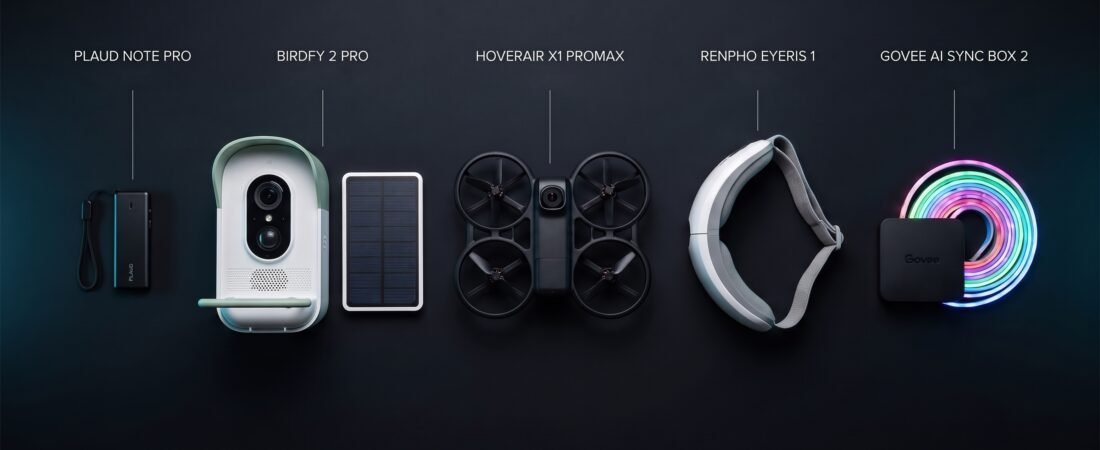
When looking for innovative futuristic gadgets on amazon, the most interesting tech is no longer restricted to experimental lab prototypes. Several advanced devices are already available to consumers in 2026: an AI recorder that turns conversations into notes, a bird feeder that identifies visiting birds, a self-flying camera, a heated eye massager, and lighting that reacts to what is on your TV.
These five products solve very different problems, so this guide focuses on what each one actually does, the trade-offs to consider, and the type of buyer most likely to benefit. Prices, availability, features, and retailer information can change; confirm the current listing before ordering.
Which futuristic gadget makes the most sense for you?
If you want practical productivity, start with the PLAUD Note Pro. For wildlife watching, consider the Birdfy 2 Pro. The HOVERAir X1 PROMAX is the most unusual option for hands-free aerial footage, while the RENPHO Eyeris 1 is a relaxation accessory. For a more immersive TV setup, the Govee AI Sync Box 2 adds screen-reactive backlighting—but only if its HDMI and display specifications match your equipment.
These are use-case recommendations, not a universal ranking. The products are not directly interchangeable, and this guide does not claim hands-on testing of every model.
Five futuristic gadgets at a glance
PLAUD Note Pro
AI-assisted meeting notes, speaker identification, and structured conversation summaries.
Birdfy 2 Pro
Dual-camera solar bird feeder with automated AI identification for backyard visitors.
HOVERAir X1 PROMAX
Pocket-sized self-flying 8K/4K drone camera designed for hands-free solo capture.
RENPHO Eyeris 1
Wearable eye comfort mask featuring gentle heat, compression, and Bluetooth audio.
Govee AI Sync Box 2
HDMI 2.1 reactive ambient TV backlighting system built for high-refresh gaming and cinema.
Compare the five gadgets
Start with the problem you want to solve. A gadget with impressive specifications is not automatically the best purchase if you will rarely use its main feature.
| Product | Main purpose | Key attraction | Important trade-off | Listing price captured |
|---|---|---|---|---|
| PLAUD Note Pro | Recording and AI notes | Transcription, speaker labels, summaries | Advanced usage may require a paid plan | $189 |
| Birdfy 2 Pro | Birdwatching | Dual-camera view and AI bird identification | Wi-Fi, placement, app and AI accuracy matter | $259.99 |
| HOVERAir X1 PROMAX | Hands-free aerial video | Self-flying camera modes and high-resolution capture | Short flight sessions, obstacle limits and local rules | Confirm current bundle price |
| RENPHO Eyeris 1 | Relaxation | Heat, vibration and air-compression massage | Fit, pressure and motor noise are personal preferences | Confirm current price |
| Govee AI Sync Box 2 | TV ambient lighting | Screen-reactive backlight with HDMI 2.1 features | HDMI chain and display compatibility are essential | Confirm current price |
Prices above are the listing details captured during research where available, not a guarantee of current pricing. Amazon ratings and review counts can change; they are intentionally not used as a lasting quality score.
PLAUD Note Pro: An AI Recorder That Turns Conversations Into Notes
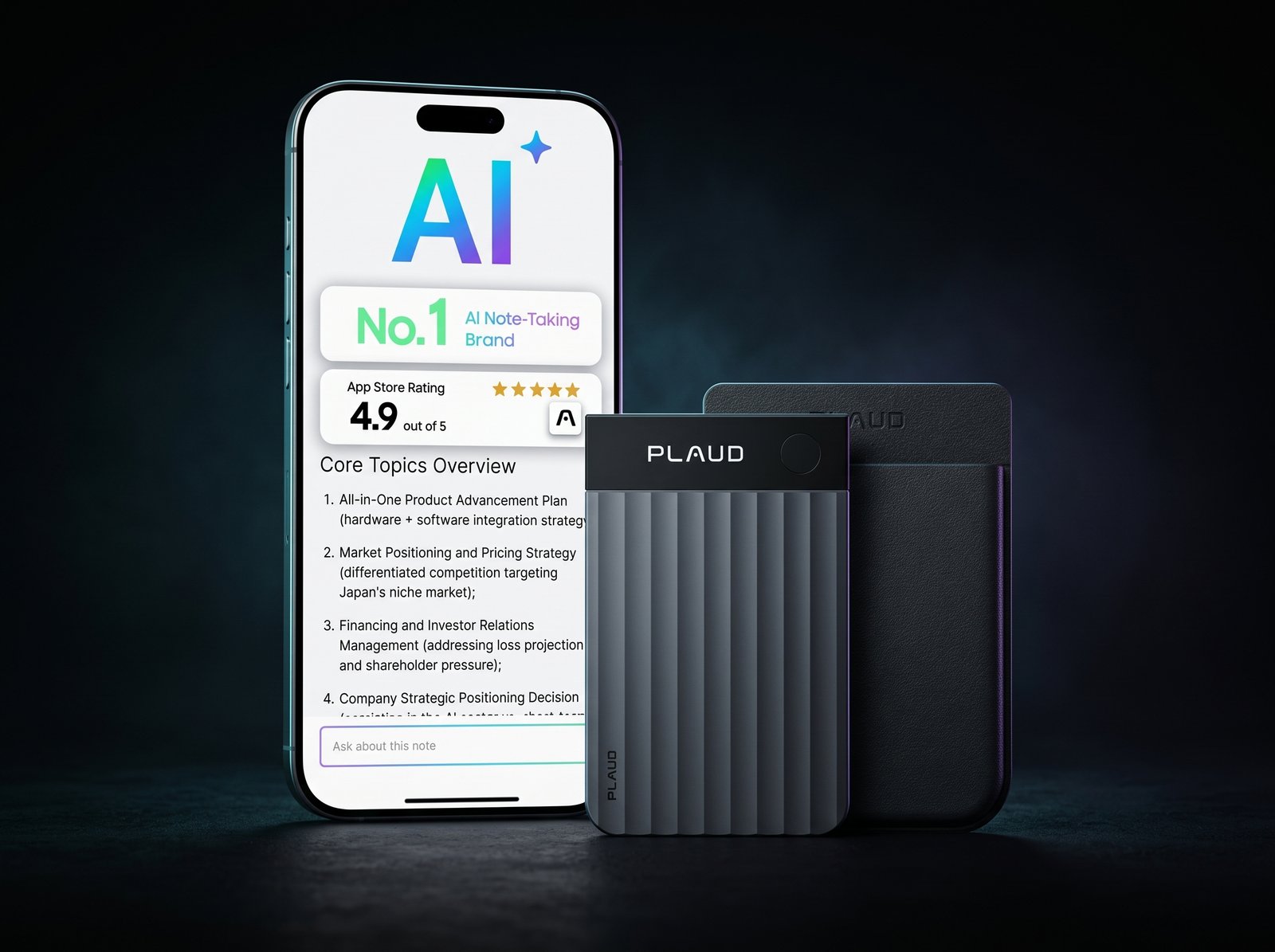
Taking useful notes during a meeting is difficult when you are also expected to listen, ask questions, and contribute. The PLAUD Note Pro is designed to capture conversations and help turn them into searchable transcripts, speaker-labeled text, summaries, and structured notes.
Its appeal is less about recording audio alone and more about what happens afterward. For people who regularly review interviews, lectures, brainstorming sessions, or work meetings, an AI-generated first draft of the notes can reduce repetitive admin. The product listing describes support for 112 languages, templates, speaker labels, and online meeting capture through Plaud Desktop.
Where the AI workflow helps
Meeting summaries can help you revisit decisions, action items, and important discussion points without replaying an entire recording. Templates can also make the output easier to scan. Still, transcription is not the same as a verified record: names, technical terms, overlapping speakers, and accents may be misheard. Review important details before sharing or acting on the notes.
Check the subscription before buying
The listing described a free Starter plan with 300 transcription minutes per month and paid options including a Pro plan with 1,200 minutes or an Unlimited plan. Plan names, minute limits, and prices may change, so confirm the current terms directly with PLAUD. If you only record occasionally, a paid plan may not be necessary; if you record frequently, calculate the recurring cost before choosing the device.
What We Like
- Combines recording with transcripts and structured summaries.
- Speaker labels and templates can make long conversations easier to review.
- May fit people who regularly document meetings or interviews.
What to Consider
- Advanced transcription use may depend on a subscription.
- AI output can contain mistakes and needs human review.
- Always get appropriate consent and follow local recording laws and workplace policies.
Who should buy: Professionals, students, researchers, journalists, and interviewers who have a recurring need to record and organize conversations.
Who should skip: Anyone who rarely records audio, prefers manual notes, or does not want another subscription or device to manage.
Category: AI voice recorder · Listing price captured: $189 · Listing details captured: 112-language support, speaker labels, summaries, templates, and online meeting capture via Plaud Desktop.
Birdfy 2 Pro Solar Smart Bird Feeder Camera: Birdwatching With AI
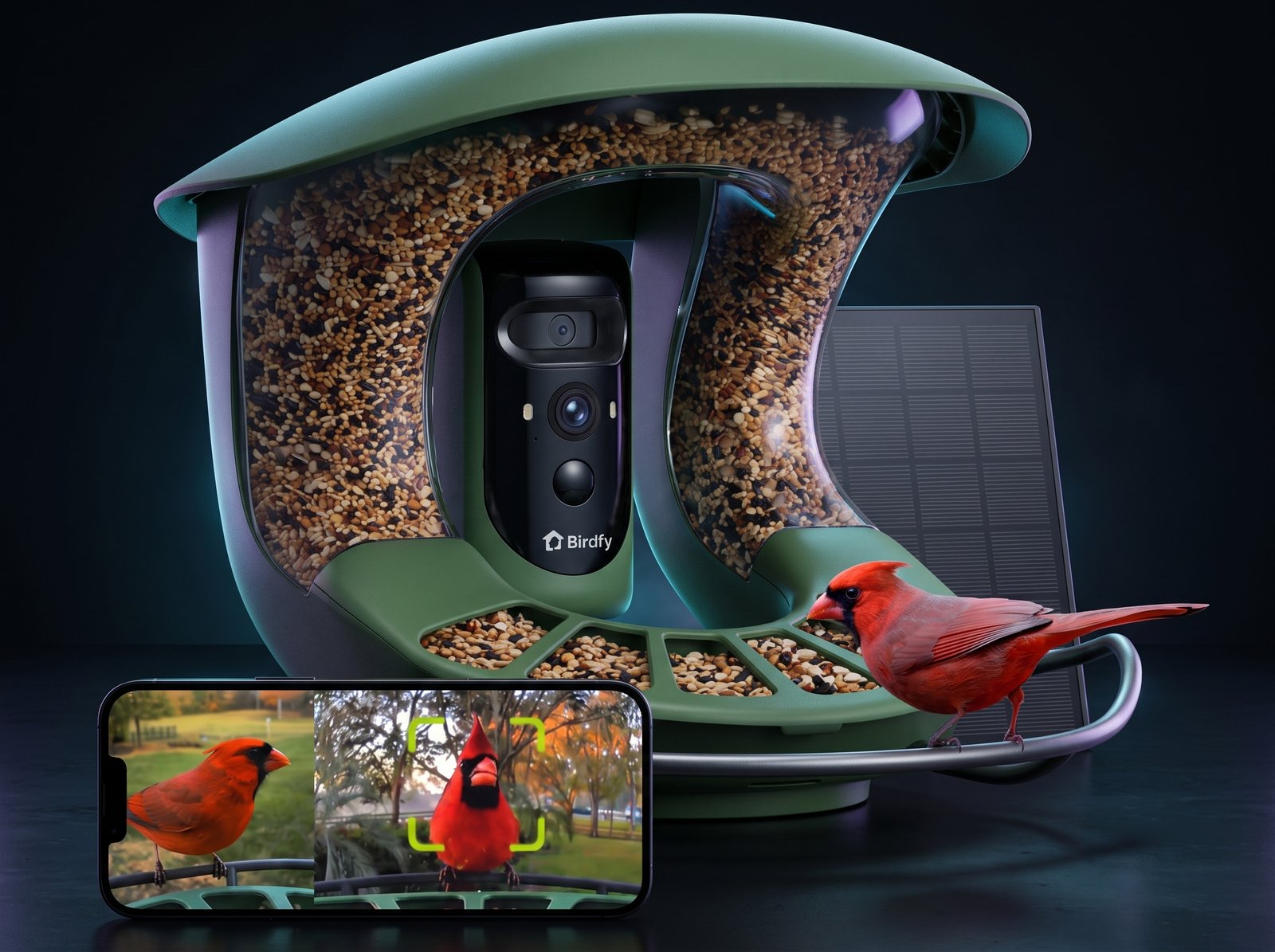
A traditional bird feeder lets you see which birds visit only when you happen to be nearby. The Birdfy 2 Pro combines a feeder with cameras and AI-based identification, making it possible to review visits from a phone and capture close-up activity that might otherwise be missed.
The listing describes a dual-camera system: a 2K tracking view for closer bird footage and a 1080p wide-angle view for broader context. It also lists a 9,000mAh battery, solar charging, AI identification covering more than 9,000 species, free cloud-storage claims, and a two-year warranty. These are seller-stated features, so confirm the exact package, storage terms, and warranty for the listing you buy.
Solar power makes placement important
A solar panel can reduce how often you need to recharge the feeder, but it does not eliminate every power issue. The panel needs suitable light, and a battery that has already run flat may need charging before the solar system can maintain it. Choose a location that balances bird activity, sunlight, camera view, and a reliable Wi-Fi signal.
AI identification is helpful, not infallible
Species identification can add context to clips and make backyard observations more engaging. However, image quality, lighting, viewing angle, and similar-looking species can affect the result. Treat AI labels as a useful suggestion rather than a definitive scientific identification. Also consider how easy it will be to clean the feeder and protect it from weather or persistent squirrels.
What We Like
- Dual views combine close-up tracking with a wider scene.
- Solar charging can reduce routine battery maintenance when sunlight is sufficient.
- Useful for reviewing visits and learning about backyard wildlife.
What to Consider
- AI identification and app performance will not be perfect in every situation.
- Wi-Fi coverage and solar-panel placement can affect the experience.
- Check local-storage options, cloud terms, cleaning needs, and weather protection before buying.
Who should buy: Birdwatchers and homeowners who enjoy observing wildlife and will take time to position and maintain the feeder.
Who should skip: Buyers who want a maintenance-free feeder, have weak outdoor Wi-Fi, or cannot provide a suitable mounting and sunlight location.
Category: Smart bird feeder camera · Listing price captured: $259.99 · Listing details captured: 2K tracking camera, 1080p wide view, 9,000mAh battery, solar panel, and AI species identification claim.
HOVERAir X1 PROMAX: A Self-Flying Camera for Hands-Free Footage
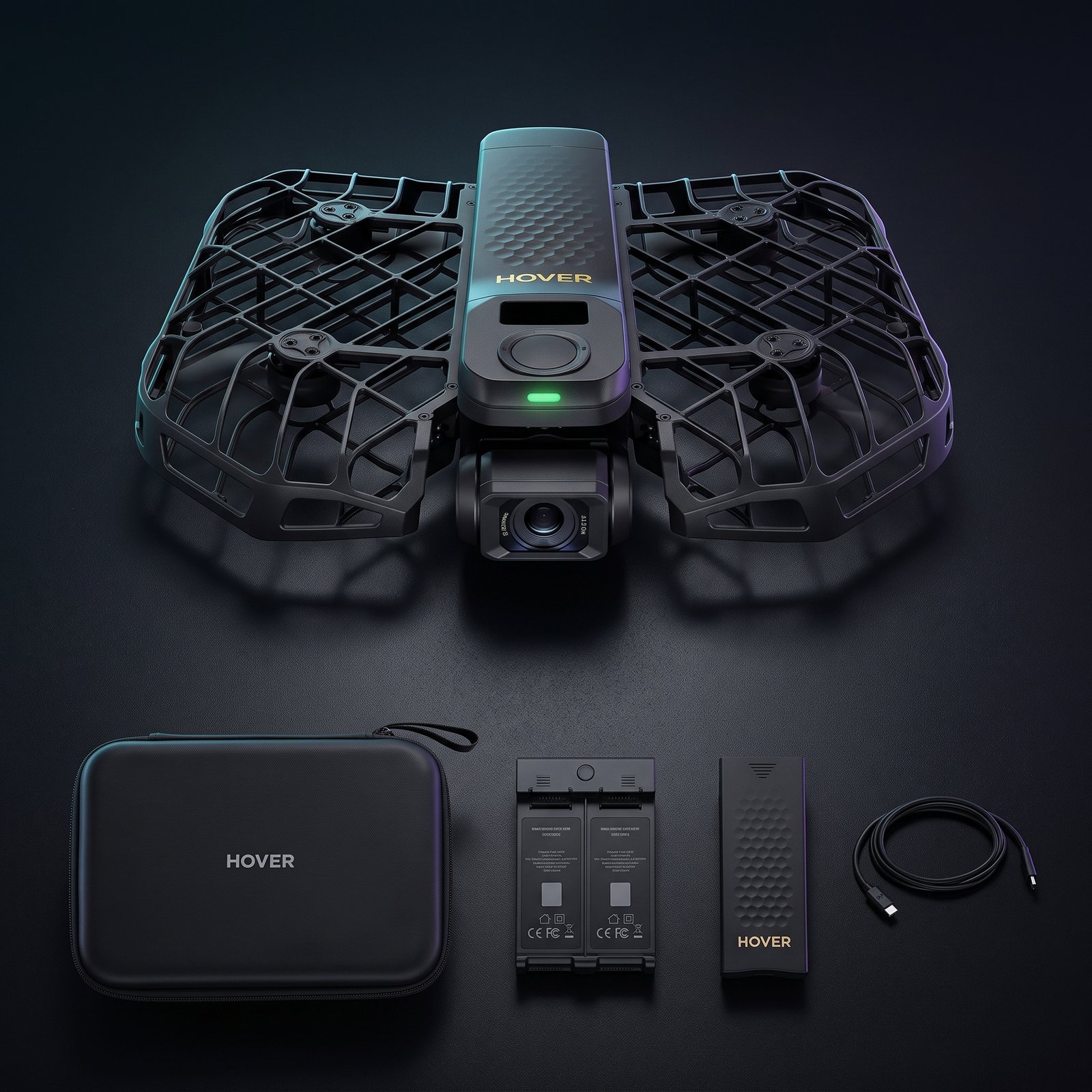
Getting aerial footage usually means learning to pilot a drone while keeping the subject framed. The HOVERAir X1 PROMAX is designed around automated flight and tracking modes, giving creators a way to capture follow shots, orbit-style clips, and overhead perspectives without constantly controlling every movement.
The reviewed Amazon bundle described 8K video at 30 frames per second, 4K at 120 frames per second, 48MP photos, a 1/1.3-inch CMOS sensor, 64GB of storage, a 192g weight, and a two-battery bundle with charging hub and case. These are listing claims for that specific bundle; check the selected package because accessories and configurations can differ.
Automated filming is the main attraction
Follow, Orbit, and Birds-eye modes are intended to simplify common creator shots. That can be useful for outdoor activities, travel clips, or solo filming when a camera operator is not available. High-resolution capture also gives editors more flexibility to crop footage, although resolution alone does not guarantee better video in every lighting condition.
Battery life and obstacle awareness still matter
Small self-flying cameras have limited flight time, and repeated takes may require battery swaps. Automated tracking should not be treated as a guarantee that the drone will avoid every obstacle or keep a subject in frame in all conditions. Review the operating environment, wind limits, return behavior, and safety instructions before flying.
Rules vary by country and location. Check the relevant aviation requirements, privacy expectations, and restrictions before using a drone—especially near people, roads, airports, or private property.
What We Like
- Automated flight modes can make solo filming easier.
- High-resolution video options offer editing flexibility.
- The reviewed bundle included two batteries, a charging hub, and a case.
What to Consider
- Flight sessions are short compared with many larger drones.
- Obstacle detection and subject tracking have practical limits.
- The Amazon listing reviewed indicated shipping restrictions for the selected delivery location.
Who should buy: Travel creators, solo content makers, and action-sports users who value automated camera moves and understand drone safety.
Who should skip: Buyers who need long uninterrupted flights, advanced manual control, robust obstacle avoidance, or guaranteed delivery to their location.
Category: Self-flying camera · Listing details captured: 8K/30fps, 4K/120fps, 48MP photos, 1/1.3-inch sensor, 64GB storage, 192g weight, and two-battery bundle.
RENPHO Eyeris 1 Eye Massager: A Heated Break From Screens

After a long day of reading, working, or looking at screens, some people prefer a quiet relaxation routine. The RENPHO Eyeris 1 is a wearable eye-massage device with heat, vibration, and air-compression massage modes. The reviewed listing also described Bluetooth audio and a remote control.
This is best understood as a comfort accessory, not a medical device that can be relied on to treat eye conditions. Warmth and massage may feel relaxing to some users, but comfort is subjective—and a tight or noisy device can have the opposite effect.
Fit and pressure are personal
Eye-massage devices apply pressure around a sensitive area. Some users may enjoy the sensation, while others may find the compression too strong, the motor noisy, or the fit awkward around the nose. If you are sensitive to pressure, start cautiously and stop if the device causes pain, dizziness, or discomfort. Follow the manufacturer’s safety guidance.
Do not buy it for unproven medical promises
Marketing language may mention eye strain, dry eyes, dark circles, or head tension, but this product should not be treated as a proven solution for eye disease, persistent dry-eye symptoms, or dark circles. If symptoms are ongoing, worsening, or affecting vision, seek advice from a qualified eye-care professional instead of relying on a massage mask.
What We Like
- Combines heat, vibration, and air-compression massage in one accessory.
- Bluetooth audio may help create a more relaxing routine.
- A dedicated remote can make controls easier to reach while wearing it.
What to Consider
- Pressure, fit, weight, and motor noise can divide users.
- Not a substitute for professional eye care or medical treatment.
- Check the return policy and cleaning instructions before purchase.
Who should buy: Adults looking for a relaxation accessory who generally tolerate wearable massage pressure and understand its limitations.
Who should skip: Anyone who dislikes pressure around the eyes, has a relevant eye condition without medical guidance, or expects a device to treat dark circles or dry-eye disease.
Category: Heated eye massager · Listing features captured: heat, vibration, air-compression massage, Bluetooth, and remote control.
Govee AI Sync Box 2: TV Backlighting That Reacts to Your Screen
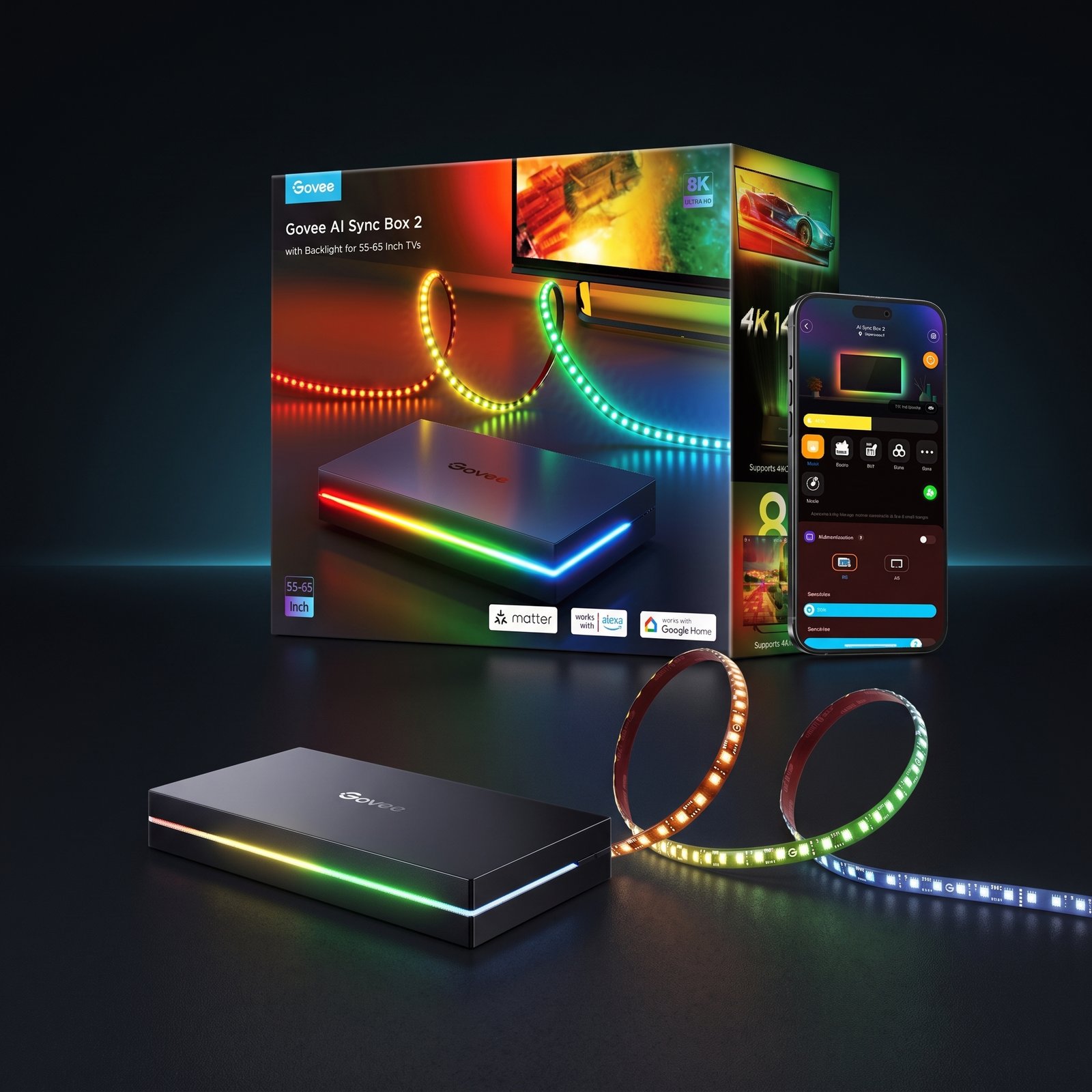
A bright screen in a dark room can feel visually disconnected from the space around it. The Govee AI Sync Box 2 is designed to extend compatible on-screen colors into ambient lighting behind a TV, creating a more immersive setup for movies and gaming.
The reviewed product listing advertised HDMI 2.1 support, up to 8K at 60Hz or 4K at 144Hz, VRR and ALLM, RGBWIC lighting, AI CogniGlow features, and integration options including Matter, SmartThings, and Alexa. Exact support depends on the product version and connected devices, so check the current specifications before purchase.
Compatibility comes before the lighting effect
Before buying, map your actual signal path: console or PC, sync box, receiver or soundbar if used, and TV. Check the resolutions and refresh rates you need, HDR support, variable refresh rate requirements, and any device that must pass through the box. A setup can be limited by the weakest link in the HDMI chain, even if the sync box advertises a higher maximum.
Expect some setup and calibration
Ambient lighting depends on the source signal and calibration. Some users report issues such as color mismatch, flickering, or HDMI handshake problems in particular configurations. These reports do not mean every setup will have the same problem, but they make compatibility checks and a sensible return policy worthwhile.
If you are also upgrading your desk or screen lighting, our guide to the best monitor screenbars in 2026 covers a different kind of display lighting: illuminating the desk while controlling screen glare.
What We Like
- Screen-reactive backlighting can make movies and games feel more immersive.
- HDMI 2.1 features target high-refresh-rate gaming setups.
- Smart-home integration may fit an existing connected-lighting setup.
What to Consider
- Confirm the complete HDMI chain supports your desired resolution and refresh rate.
- Color matching, flicker, or handshake issues may occur in some setups.
- It is an extra expense that matters most to users who value ambient lighting.
Who should buy: TV and gaming enthusiasts who want reactive backlighting and have checked compatibility with their devices.
Who should skip: Anyone with an incompatible HDMI setup, users who prefer a simple bias light, or buyers who do not care about synchronized ambient effects.
Category: HDMI 2.1 AI sync box with TV backlight · Listing claims captured: up to 8K/60Hz or 4K/144Hz, VRR/ALLM, RGBWIC, and smart-home integrations.
How to choose the right futuristic gadget
These products are futuristic in different ways. Use the following questions to decide whether a feature is likely to make a real difference in your routine.
Choose based on the problem—not the spec sheet
- For less admin after meetings: Choose an AI recorder only if you regularly revisit conversations and are comfortable reviewing machine-generated notes.
- For a more engaging backyard: Choose a smart bird feeder if you can provide stable Wi-Fi, suitable sunlight, and routine cleaning.
- For solo video creation: Choose a self-flying camera if automated tracking is valuable and you can work within flight-time, safety, and legal limits.
- For a relaxation ritual: Choose a heated eye massager for comfort—not as a treatment for an eye condition.
- For a gaming or movie room: Choose a sync box only after confirming signal-path compatibility and the display modes you use.
Consider total ownership cost
The purchase price is only one part of the decision. AI recording may involve recurring plans; a smart feeder may depend on cloud services or accessories; a drone needs safe batteries and charging habits; and a sync box is useful only if it works with your existing TV and sources. Compare the ongoing costs and setup effort with how often you expect to use the main feature.
Look beyond headline claims
Numbers such as 8K, 2K, refresh rate, battery capacity, or the number of AI-recognized species can be useful, but only in context. Check the specific model, supported modes, software requirements, limitations, warranty, and return terms. A well-matched device is usually a better purchase than the one with the biggest number on its box.
Who should skip these futuristic gadgets?
You do not need a futuristic gadget just because the technology is interesting. Skip the purchase when the main feature does not solve a recurring problem, when the setup requirements do not fit your home, or when a simpler product would do the job.
- Skip an AI recorder if you rarely need transcripts or do not want to manage recording consent and subscription details.
- Skip a smart feeder if outdoor Wi-Fi, sunlight, cleaning, or maintenance would be difficult.
- Skip a self-flying camera if you need long flight sessions or are not prepared to learn and follow drone safety rules.
- Skip an eye massager if you dislike pressure around your eyes or are looking for a medical treatment.
- Skip a sync box if your current devices cannot pass through the video formats you need or if ambient lighting is not important to you.
Frequently asked questions
Are these gadgets really futuristic, or are they just smart accessories?
They are consumer products using newer capabilities such as AI-assisted transcription, computer-vision identification, automated flight, wearable massage features, and screen-synchronized lighting. Their usefulness still depends on the problem they solve and how reliably they work in your setup.
Which gadget is the most practical for everyday use?
It depends on your routine. The PLAUD Note Pro may be practical for people who frequently document meetings, while the RENPHO Eyeris 1 is aimed at relaxation. The bird feeder, drone, and sync box are more dependent on specific hobbies or equipment.
Do AI features always produce accurate results?
No. Transcription can mishear speech, bird identification can be wrong, and automated camera tracking has limits. Review important output and treat AI results as assistance rather than guaranteed truth.
Should I buy based on Amazon ratings alone?
No. Ratings and review counts can help, but they do not establish that a product suits your needs. Read recent reviews for recurring problems, confirm the exact model and bundle, and check compatibility, warranty, and return terms.
Can the Govee AI Sync Box 2 work with every TV and console?
Do not assume universal compatibility. Check the sync box’s current port and format support against your console or PC, receiver or soundbar, and TV—including the resolution, refresh rate, HDR, VRR, and ALLM features you use.
Are these products worth buying in 2026?
They can be worthwhile when the main feature solves a real need. Compare the current price, total ownership cost, compatibility, limitations, and how often you will use the product before deciding.
What this guide is based on
This buying guide uses the product listings reviewed for the five named models, including the stated features and package details, plus independent review context for practical limitations. Seller claims are identified as listing claims where appropriate. The article does not present these products as having been hands-on tested by The Few Picks.
- PLAUD — official website for current product, plan, and privacy information.
- Birdfy — official website for current feeder specifications, support, and warranty terms.
- HOVERAir — official website for current drone specifications, flight guidance, and safety information.
- RENPHO — official website for current product and safety information.
- Govee — official website for current sync box compatibility and feature information.
Prices, availability, ratings, software features, included accessories, and seller policies may change after publication. Confirm the exact listing and current manufacturer documentation before purchase.
Buy the feature you will actually use
The PLAUD Note Pro is the clearest fit for recurring note-taking needs; Birdfy 2 Pro makes backyard observation more interactive; HOVERAir X1 PROMAX targets hands-free creators; RENPHO Eyeris 1 is a personal comfort accessory; and Govee AI Sync Box 2 is for compatible TV setups that benefit from reactive lighting.
The best choice is the one that fits your routine, works with your equipment, and earns its place after the novelty wears off.
Editorial note: This article is a research-based product guide, not a report of hands-on testing of every item. Product details and retailer listings were reviewed for this guide, but independent testing, user experiences, and seller claims are not interchangeable. Verify important specifications and current terms before buying.